

Nothing in an IT project produces more complaints than a change nobody saw coming. It does not have to be a failure. The work can go exactly to plan and still cost you a week of frustrated calls if the people affected found out when it happened.
Stay in touch with your project manager
Your project manager is holding a schedule that depends on answers from you: who approves changes, when we can get access, which dates are off limits. A question that waits a week for a reply moves the whole timeline by a week. A quick answer, even “I need until Thursday,” lets us plan around it. If your contact will be out, name a backup.
Every project we run has its own ProjectHub page, so you do not have to wait for an email to see where things stand. It shows overall progress, every phase with the dates it opened and closed, and the estimated completion.
Tell the people the project touches
Take an email filtering project. After go-live, staff see something different in their inbox. They get digest reports of held messages, and they need to know how to ask for a legitimate message to be released. Nobody has to approve of the change, but leadership and staff should know it is coming, what it will look like and who to ask. Otherwise the first sign of it is a client email that never arrived.
Hardware projects work differently. Replacing a switch, firewall or wireless access points does not change what staff see on screen, but it usually means downtime. A closing, a video hearing, a payroll run or an online test scheduled inside that window turns a planned outage into a real problem. Staff who know the date and the window can plan around it.
Give leadership the ProjectHub link
Staff need the date and what will change. Leadership usually wants more: how far along the project is and whether it is on schedule.
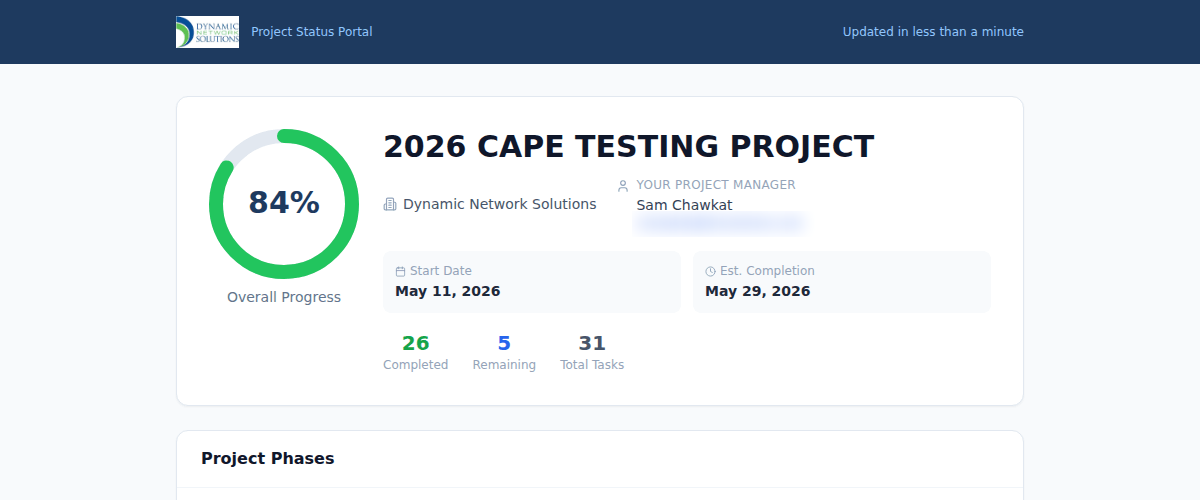
ProjectHub answers that without you in the middle. It is one link, and it shows the same data our engineers work from: percentage complete, tasks done against the total, every phase with its dates, and your project manager by name. It updates within a minute of the work changing. Send it to the owner, superintendent or board member who would otherwise be asking you.
The message should come from you
We can supply the dates, what is changing and a draft you can edit. We should not be the one to send it, for three reasons.
Your staff know your name. A notice from an outside vendor looks like every other unfamiliar email, and people have been taught not to trust those.
You know your calendar. We do not know who has a deadline Thursday, who is out that week or which department cannot lose internet at 2 p.m.
Your point of contact is a trusted voice inside your organization. It might be an owner, an Operations Manager or an office lead, but staff already take direction from that person. A notice from them gets read and acted on, and they know which leaders should see it first.
Ask your project manager for the notice, review it, send it under your name, and tell us when it has gone out. That one step takes the surprise out of go-live day.
Nick Kalapodis is Projects/Field Services Department Manager at Dynamic Network Solutions.